
TL;DR

Get home office essentials delivered free — and shop member deals
- Fast, free delivery on millions of items
- Access to Prime Big Deal Days deals on October 6–7
- Prime Video, Amazon Music and more included
A glass break sensor detects the sound or vibration of breaking glass and alerts a compatible alarm system. Acoustic models can cover several nearby windows in one room, while vibration models usually protect the window they attach to. Before choosing a kit, check compatibility, placement guidance, alert options, and what still works during an internet or power outage.
A window contact can stay quiet when someone breaks a pane and reaches through without opening the sash. That gap is why a glass break sensor kit for home security may add a useful layer to an alarm setup.
These kits are not all alike. Some listen for the sharp pattern of breaking glass across a room; others attach to a pane or frame and react to vibration. You’ll learn how those types differ, what to check before replacing a sensor, and how to avoid buying a kit that cannot talk to your existing system.
Acoustic sensors listen for break-related sound and may cover nearby windows in one room; vibration sensors generally protect the surface where they are mounte…
A glass-break sensor detects a different event from a window contact, so the two can complement each other.
Check exact hub, panel, app, and monitoring compatibility before choosing a replacement kit.
Room layout, obstructions, noise, mounting, and glass type can affect detection; use the maker’s placement and test guidance.
Ask how the hub and alert path behave during internet or power outages, and treat the sensor as one layer of home security.
What a glass-break kit can detect that a window contact may miss
A glass break sensor kit for home security detects sound or vibration associated with breaking glass, then sends an alert to a compatible alarm system. A kit may include sensors, mounting hardware, and sometimes a hub or control panel; what arrives in the box varies by model. [1]
That detection can matter when a burglar breaks a pane and reaches for the latch without opening the window. A contact sensor generally reports the window opening, while a glass-break sensor aims to detect the break itself. Neither device covers every way someone could enter.
Imagine a ground-floor sunroom with a wide sliding door. A contact on the door can alert you when it opens, and a glass-break sensor may provide another signal if the glass breaks first. Together, they add two different clues to the alarm system.
Key point: Glass-break detection complements window contacts; it does not replace them, a strong lock, or a complete alarm plan.
Products also differ in whether alerts go to a local siren, phone app, monitoring center, or a combination. A sensor is only useful if its alert reaches somewhere you can act on it, so check the whole chain from window to hub to notification.
Acoustic and vibration sensors protect windows in different ways
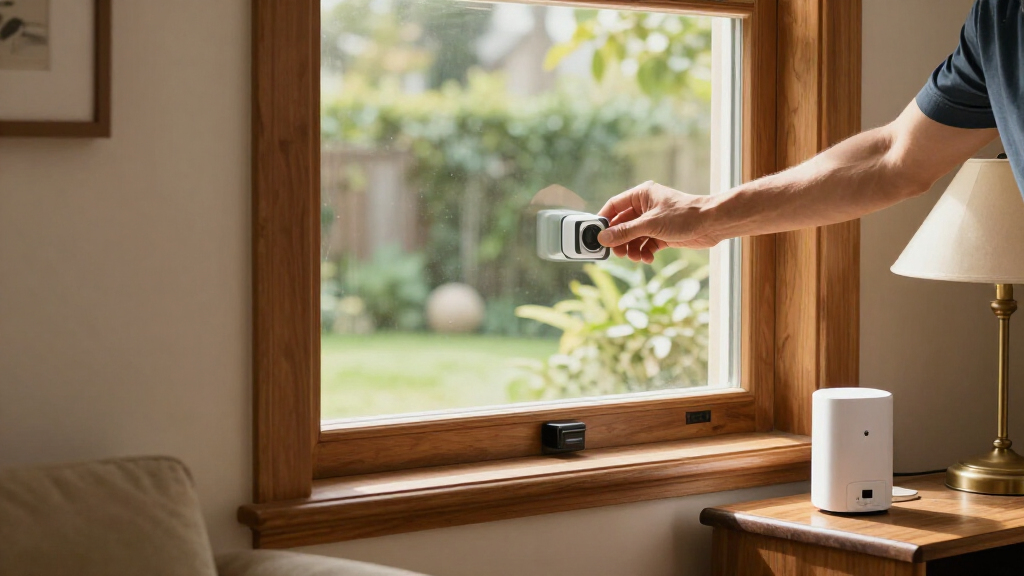
An acoustic sensor listens for the sound pattern of breaking glass, while a vibration sensor reacts to impact or movement at the surface where it is mounted. That difference shapes how many windows each unit may cover and where you install it. [1]
An acoustic unit might sit on a shelf or wall in a living room and cover several nearby panes if they fall within its stated range. A vibration unit usually attaches to one window or frame, so it is a more direct fit for a particular pane. Room shape, glass type, and mounting instructions still matter.
For example, one sensor in a small room with two adjacent windows may be a plausible acoustic setup if the manufacturer’s guidance supports it. For a detached garage window across the yard, a vibration alarm mounted on that pane may make more sense than expecting a room sensor inside the house to hear it.
| Sensor type | What it detects | Typical fit | What to check |
|---|---|---|---|
| Acoustic | Sound pattern associated with breaking glass | Several nearby windows in one room may fit | Specified range, room layout, obstructions, and noise |
| Vibration or shock | Impact or vibration at the mounted surface | The specific pane or frame where it is installed | Mounting surface, placement, and glass compatibility |
Some alarms combine glass-break detection with other functions, such as motion sensing. Read the feature list closely: a product name can sound broad while the actual detection method remains quite specific.
Check these five details before choosing a replacement kit
A replacement glass break sensor kit for home security needs to fit your alarm ecosystem as well as your windows. Check the hub, panel, app, and monitoring service before comparing detection range or extra features. Compatibility belongs at the top of the list because a sensor that cannot pair with the system may not deliver the alerts you expect. [1]
- Confirm compatibility. Find the exact hub or alarm-panel model and verify that the sensor is supported. Similar brand names or wireless labels do not prove that two devices pair.
- Match the detection method to the room. Acoustic sensors listen across a room; vibration sensors attach to the protected window. Look at the number, spacing, and location of your panes.
- Read the coverage guidance. Check the stated range and any limits on walls, closed doors, curtains, furniture, or glass types. Treat coverage as setup guidance, not a promise that every home will behave the same way.
- Trace the alert path. Find out whether the system sounds locally, sends app notifications, contacts a monitoring center, or offers more than one option. Check whether monitoring requires a separate plan.
- Check power and upkeep. Confirm the battery type, battery-life guidance, wireless range, hub requirements, and maintenance steps. Ask what remains active when the internet or household power fails.
Say you already use a hub for door sensors and a siren. An inexpensive standalone vibration alarm might still be useful on an outbuilding, but it may not send events into that hub. If you want one app and one coordinated alarm response, verify integration before purchasing.
Some product listings may mention a sensor that appears discontinued or unavailable in a particular store or region. Treat that as a prompt to check directly with the manufacturer; product status and supported features can change. Compare alternatives by category fit, and do not assume a replacement has the same specifications unless the maker confirms it.
Choose a kit by the windows and alert path you need
The best-fit glass break sensor kit for home security depends on whether you need a standalone sounder, a sensor that joins an existing hub, or a starter system with several security devices. Those categories serve different jobs, so compare their use cases instead of assuming that every glass-break product is a like-for-like replacement.
For a renter who wants a simple local warning on one vulnerable window, a self-contained vibration alarm may suit the task if mounting is permitted. For a homeowner with several windows in a connected living room, an acoustic sensor paired with a compatible alarm system could be a more convenient fit. Check the maker’s instructions in either case.
| Option category | May suit you if… | Verify before choosing |
|---|---|---|
| Multi-pack vibration alarms | You want to place a separate alarm on several specific panes | Whether each unit works independently, its local alarm behavior, mounting needs, and battery upkeep |
| DIY alarm starter kit | You need a wider setup with a hub or panel and multiple sensor types | Included components, glass-break support, app features, monitoring terms, and future expansion |
| Brand-specific acoustic sensor | You already use a compatible security ecosystem and want room coverage | Required hub, stated range, supported glass types, and whether other windows in the room fit |
Current product listings include multi-pack vibration alarms, DIY alarm starter kits, and hub-dependent glass-break sensors. Those are category examples, not proof that the products pair with one another. A listing that says “wireless” only describes a connection method; it does not guarantee compatibility with your panel or app.
To make a fair comparison, write down the exact devices you own and the windows you want to protect. Then ask the manufacturer whether the candidate sensor is supported by your hub, whether it triggers a local siren, and whether phone alerts or professional monitoring require a subscription.
Install sensors where the glass and the signal stay in reach
Correct placement gives a glass-break sensor its best chance to detect an event and send a usable alert. Follow the product’s placement instructions, keep acoustic sensors within their stated coverage, and mount vibration sensors securely on the specified part of the window or frame. [1]
In a living room, a thick curtain and a tall bookcase can affect how sound travels from a window to an acoustic sensor. If the instructions call for a clear path, do not tuck the unit behind a cabinet because it looks tidier there. For a vibration model, a loose or unsuitable mounting surface may affect the response.
Use the manufacturer’s approved test mode or test tool after installation. Breaking a drinking glass or window pane is a poor test: it can injure someone, damage property, and fail to match the product’s testing procedure.
- Place an acoustic unit according to its stated range and room guidance.
- Mount a vibration unit only on a surface its instructions support.
- Check the hub connection and app alert after pairing.
- Record the battery and maintenance guidance somewhere you can find it.
If one room has a closed doorway, an L-shaped layout, or windows on opposite ends, ask the manufacturer whether one acoustic sensor is appropriate. A stated range does not necessarily mean the sensor can detect breaking glass through every wall or obstruction.
Know what can trigger a false alarm or a missed alert
No glass-break sensor is guaranteed to detect every break, prevent an intrusion, or send an alert in every outage. Acoustic sensors can be affected by room acoustics and other sounds; vibration sensors depend on mounting and window construction. False alarms and missed detections are both possible. [1]
A television scene with a sharp crash, clattering dishes, or loud kitchen work might create confusing sounds in some rooms. The actual risk depends on the product and its surroundings, so read the maker’s guidance and use the approved test procedure instead of guessing at sensitivity.
Glass types can matter too. Tempered, laminated, double-pane, or film-covered glass may break differently from a standard pane, and product support varies. If your home has specialty glazing, check the sensor’s compatibility notes before treating it as a match.
Consider a practical example: a sensor sends an alert during a noisy dinner, then someone silences it without checking. Clear instructions for household members—what the tone means, how to confirm an event, and whom to contact—can make an alert more useful. Pair electronic detection with sound locks, secure frames, and sensible lighting.
A sensor is one layer of protection. It can alert you to a possible event; it cannot guarantee detection or stop someone from entering.
Plan for the hour your Wi-Fi, power, or hub goes quiet
A battery-powered sensor may keep running during a Wi-Fi outage, but app notifications and monitoring can still depend on the hub’s power and communication links. The system’s behavior during an outage is model-specific, so check it before relying on phone alerts as your only warning. [1]
Ask whether the hub has backup power, whether it can communicate over a cellular connection, and whether a local siren still sounds if the internet drops. Also check what happens if a sensor loses its connection to the hub. These details can matter more than an extra smart-home feature.
For example, imagine a storm knocks out power while you are away. A battery-powered sensor might detect a break, but the result depends on the hub’s backup battery, its connection to the sensor, and its route for sending alerts. Map each link instead of assuming “battery powered” means the whole security system stays online.
Features and monitoring terms change across brands and regions. Confirm current app requirements, supported platforms, firmware needs, and any subscription conditions with the manufacturer before you settle on a kit.
Use these key points to decide whether you need one
A glass-break sensor earns its place when it adds a useful detection method to a real gap in your home’s setup. If a reachable pane could be broken without opening the window, it may add an alert that a contact sensor alone would not provide; whether the added coverage is worthwhile depends on the room and compatible alarm system. [1]
Think about a ground-floor room with several accessible windows. You might use contacts to report openings and an acoustic sensor to listen for break-related sounds, provided its range and room conditions fit. A single vibration sensor on one window would serve a narrower purpose.
- Choose acoustic coverage when the protected windows sit in one suitable room and the stated range fits.
- Choose vibration coverage when you want a sensor attached to a specific pane or frame.
- Check ecosystem fit if alerts need to reach an existing app, panel, or monitoring service.
- Keep physical security in the plan with sound locks and secure window hardware.
If you are comparing kits for home use, a short inventory helps: list the windows, note which already have contacts, identify your alarm hub, and mark the rooms with unusual glass or noisy conditions. That turns a vague shopping search into a specific compatibility and coverage check.
Frequently Asked Questions
Can one glass-break sensor protect several windows?
An acoustic sensor may cover several windows in one room when they fit the manufacturer’s stated range and placement guidance. A vibration sensor generally protects the pane or frame where it is attached. Walls, doors, furniture, curtains, and room shape can affect acoustic coverage.
Do glass-break sensors work through walls?
Coverage through walls or closed doors varies by model, and you should not assume a sensor will reliably hear glass in another room. Check the manufacturer’s placement instructions and stated range; acoustic sensors are generally best placed in the same room as the glass they monitor.
Will a glass-break sensor detect a window being opened?
Usually, a window contact detects opening, while a glass-break sensor detects sound or vibration associated with breaking glass. They provide different signals and can complement each other in a home alarm setup.
Can television, pets, or kitchen noise trigger a false alarm?
Other sounds may contribute to false alarms with some acoustic sensors, depending on the room and product. Read the manufacturer’s guidance, place the sensor as instructed, and use its approved test method after installation.
How can you test a glass-break sensor safely?
Use the manufacturer’s test mode or an approved test tool. Do not break a household glass or window to test it; that can cause injury or property damage and may not follow the product’s testing procedure.
Conclusion
Start with the windows you want to protect, then match the sensor type and alert path to the room and alarm system you have. Verify compatibility and outage behavior with the manufacturer, and test the installed sensor using its approved method.
A sensor can add a useful set of ears or a steady hand to your security setup. Your locks, your layout, and a working route for alerts still matter.
Fall Picks
fall essentials
As an affiliate, we earn on qualifying purchases.